
The best way to understand software is to use it. So we built a version of FloatR you can use right now. No account, no sales call, nothing to install.
Every staffing platform says it's easy. Most of them ask you to take their word for it: a contact form, a callback, a calendar invite, and finally a screen-share where somebody else does all the clicking.
We'd rather you did the clicking.
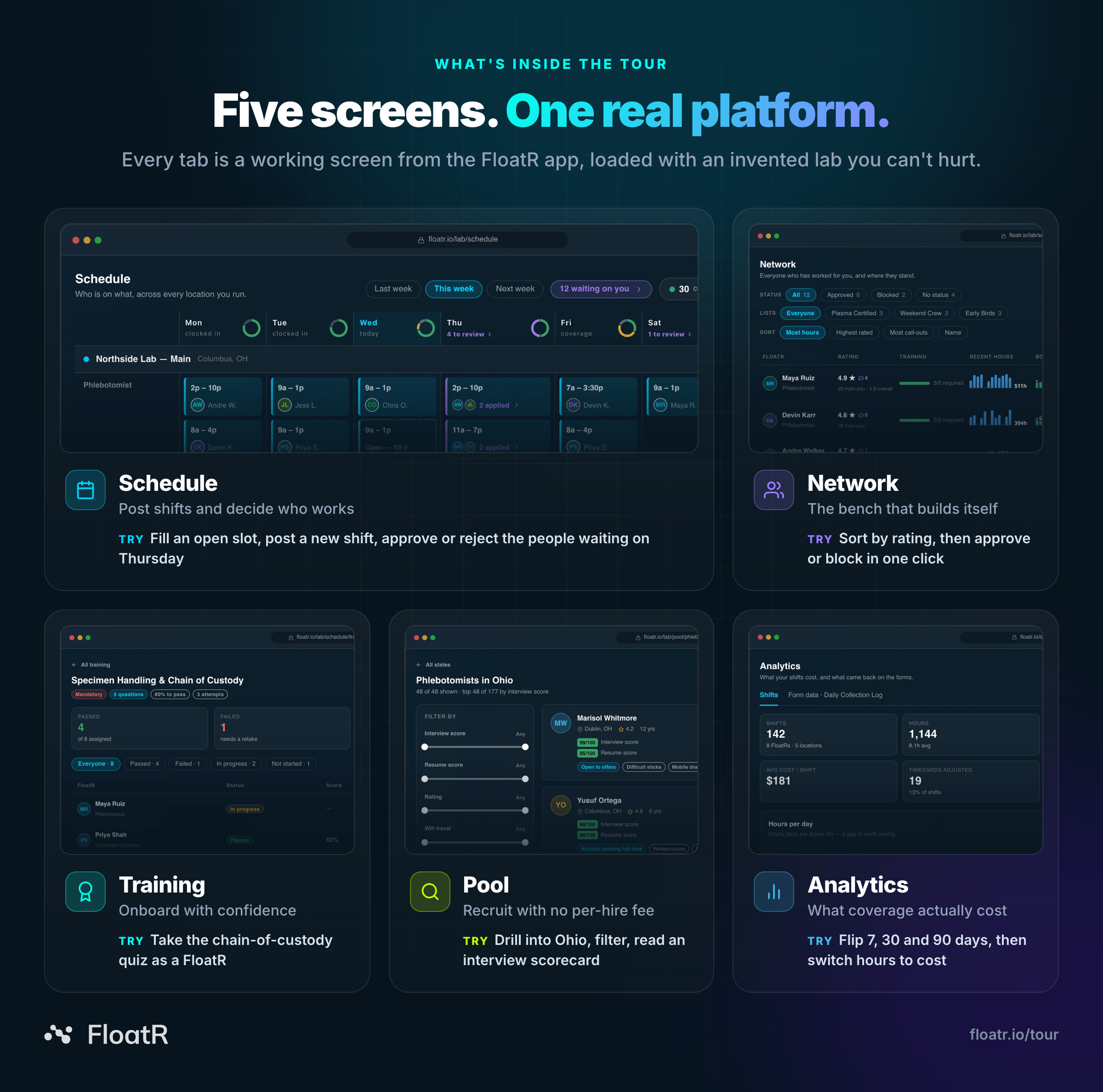
Today we're launching the FloatR Product Tour at floatr.io/tour. It's five real screens from the FloatR platform, the same screens your account opens on, running on an invented lab with an invented week and invented people. Post a shift and watch it get covered. Approve the people waiting on Thursday. Sit the onboarding quiz yourself. Search the national hiring pool. Find out what a month of coverage cost.
Then break it. That's what it's there for.
Take the tour now: floatr.io/tour. It works in any browser, and there's nothing to sign up for.
A simulation, not a slideshow
Most product tours are a carousel of screenshots with arrows drawn on them. Ours isn't. Every button in the tour does what it does in the app:
- Open slots really fill. Click one, and a moment later a FloatR has claimed it.
- Approvals really book. Approve an applicant and everyone else on that shift is marked Not selected.
- Counts really move. Approve someone in your Network and the tallies at the top update as you click.
- Quizzes really grade. Answer five questions and get a score, your answers replayed, and an explanation for every miss.
- Numbers really recalculate. Switch from 30 days to 90 and every figure on the dashboard is recomputed.
Nothing you do is saved, and nothing you do can hurt anyone. The lab is fictional, the FloatRs are fictional, and a reload puts the whole week back exactly as you found it. Switch between tabs and your changes stay put, so you can approve someone in Schedule, then go and find them in Network.
Five screens, one invented lab
The tour opens on a fictional lab group in central Ohio: Northside Lab — Main in Columbus, Westgate Draw Station in Hilliard and Riverbend Clinic in Dublin. They're staffed by a regular crew of FloatRs you'll get to know by name: Maya, Devin, Priya, Andre, Jess and the rest. Each tab picks up a different part of running that crew.
1. Schedule: post a shift, watch it get covered
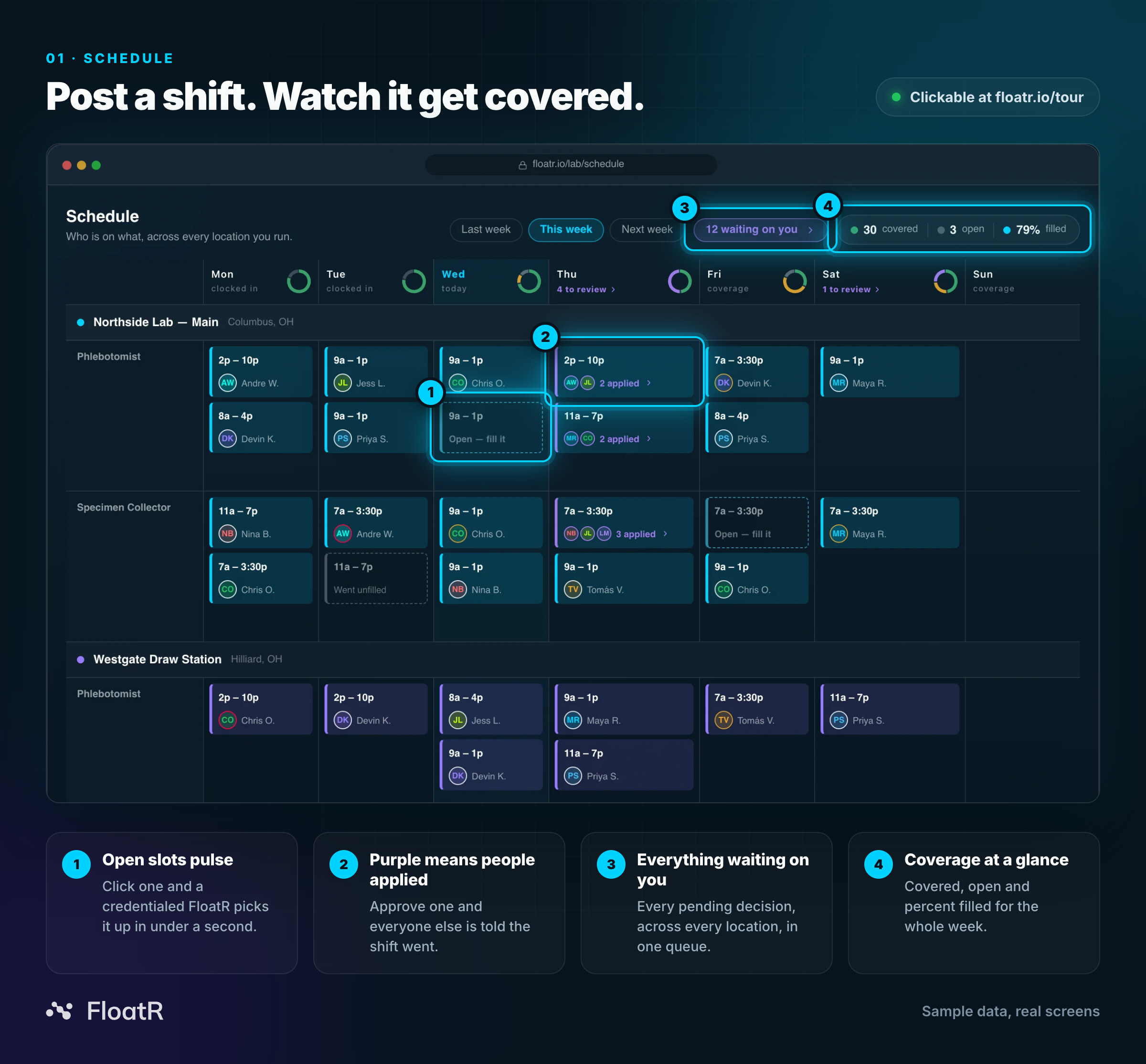
The Schedule is your whole week on one board: every location, every role, every day. Open slots pulse. Click one and FloatR goes to work. After a brief Matching…, a credentialed FloatR has claimed it. Hover any empty cell from today onward and a + Post button appears, so you can post a brand-new shift and fill that too.
Purple cards mean people have applied. Click one, or the 12 waiting on you button at the top, and you get the day's applications with everything you need to decide: each applicant's rating, how many shifts they've worked for you, their clock-in record, distance, rate and credentials, plus a Best match or First time with you badge. Approve one and the shift is booked, and everyone else is told it went. Reject everyone and the shift goes back on the board.
Try this: Click 12 waiting on you and approve Maya Ruiz. She's a 4.9 with 41 shifts at your lab and a perfect clock-in record.
2. Network: the good ones come back
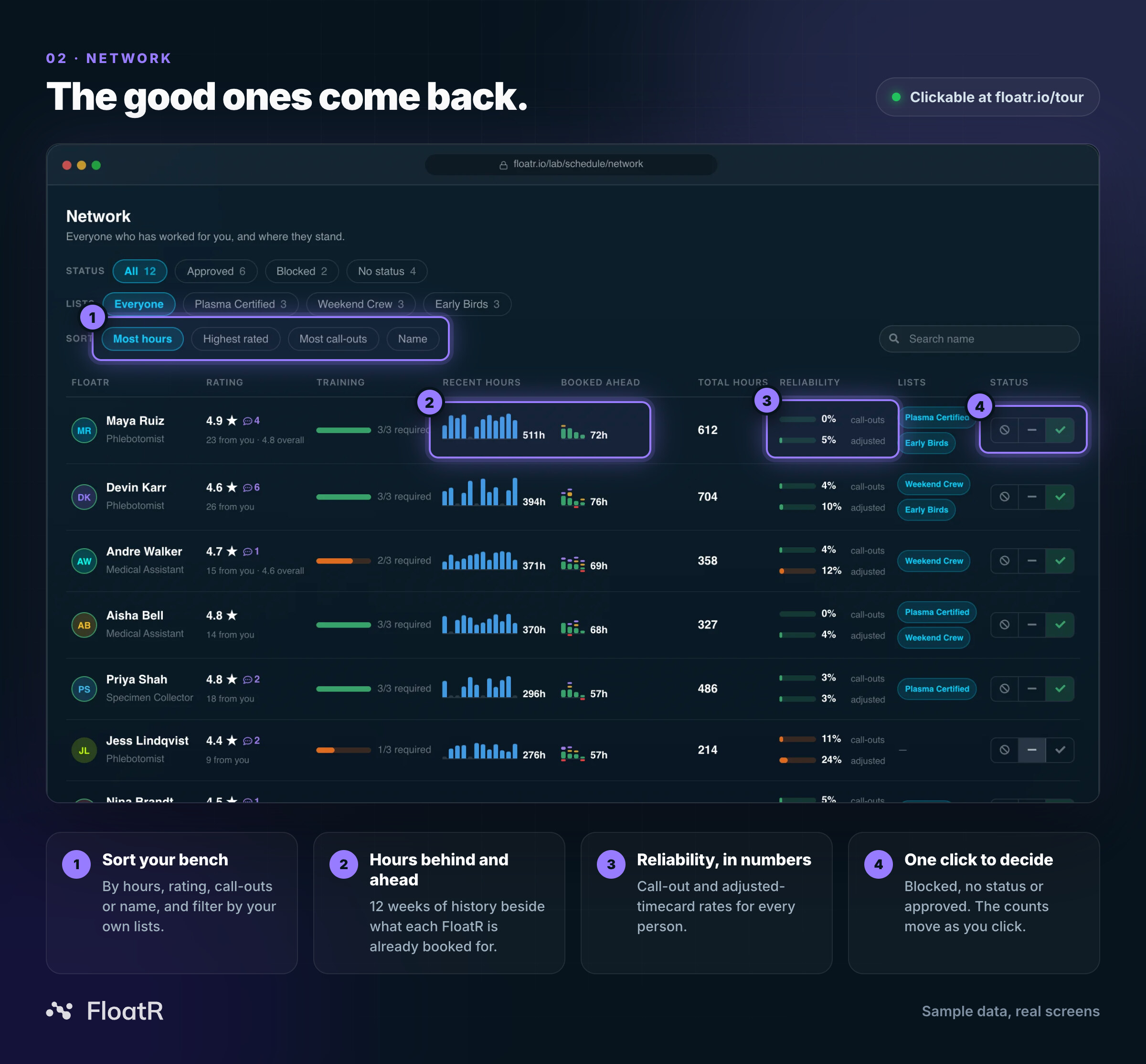
Network is everyone who has worked for your lab, with the record they've built with you specifically. Every row shows their rating, training progress, 12 weeks of recent hours, what they're already booked for, lifetime hours and two reliability rates: call-outs and adjusted timecards.
Sort by most hours, highest rated, most call-outs or name. Filter by status, or by your own lists like Plasma Certified, Weekend Crew and Early Birds. Then decide. Every row ends in a three-way switch, Blocked · No status · Approved, and the counts at the top move with you. Block someone and their upcoming bookings clear on the spot.
Try this: Sort by Most call-outs and see who rises to the top. Then approve Jess Lindqvist and watch the Approved count tick up. (Want the full story on Network? Read Introducing Network.)
3. Training: onboard them before they turn up
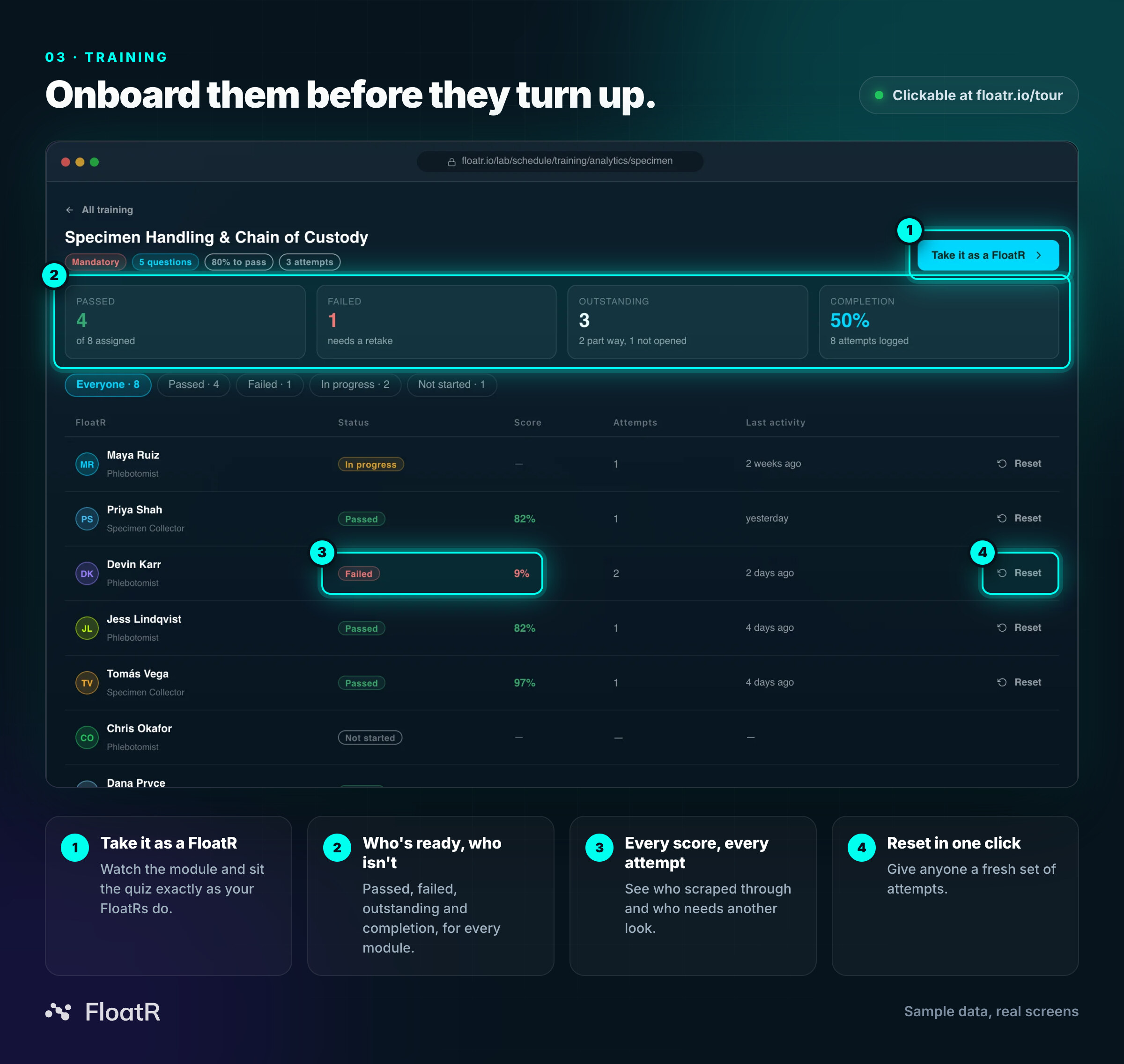
Training is your library of onboarding modules: videos, PDFs and quizzes with pass marks and attempt limits. Open one and you can see who has passed, who has failed, who's partway through and who hasn't opened it yet, with every score and every attempt. Reset anyone who needs another go.
Then do something no screenshot can: press Take it as a FloatR. You'll see the module exactly as a FloatR sees it on their phone before their first shift, then sit the quiz yourself. You'll get a pass or a fail, your answers replayed, and an explanation for anything you missed. Head back to the lab view and your own attempt is sitting at the top of the roster.
Try this: Open Specimen Handling & Chain of Custody and take the five-question quiz. The pass mark is 80%. First question: you're drawing a blood culture, a light blue citrate tube and a lavender EDTA tube. Which comes first?
4. Pool: hire the bench, not the shift
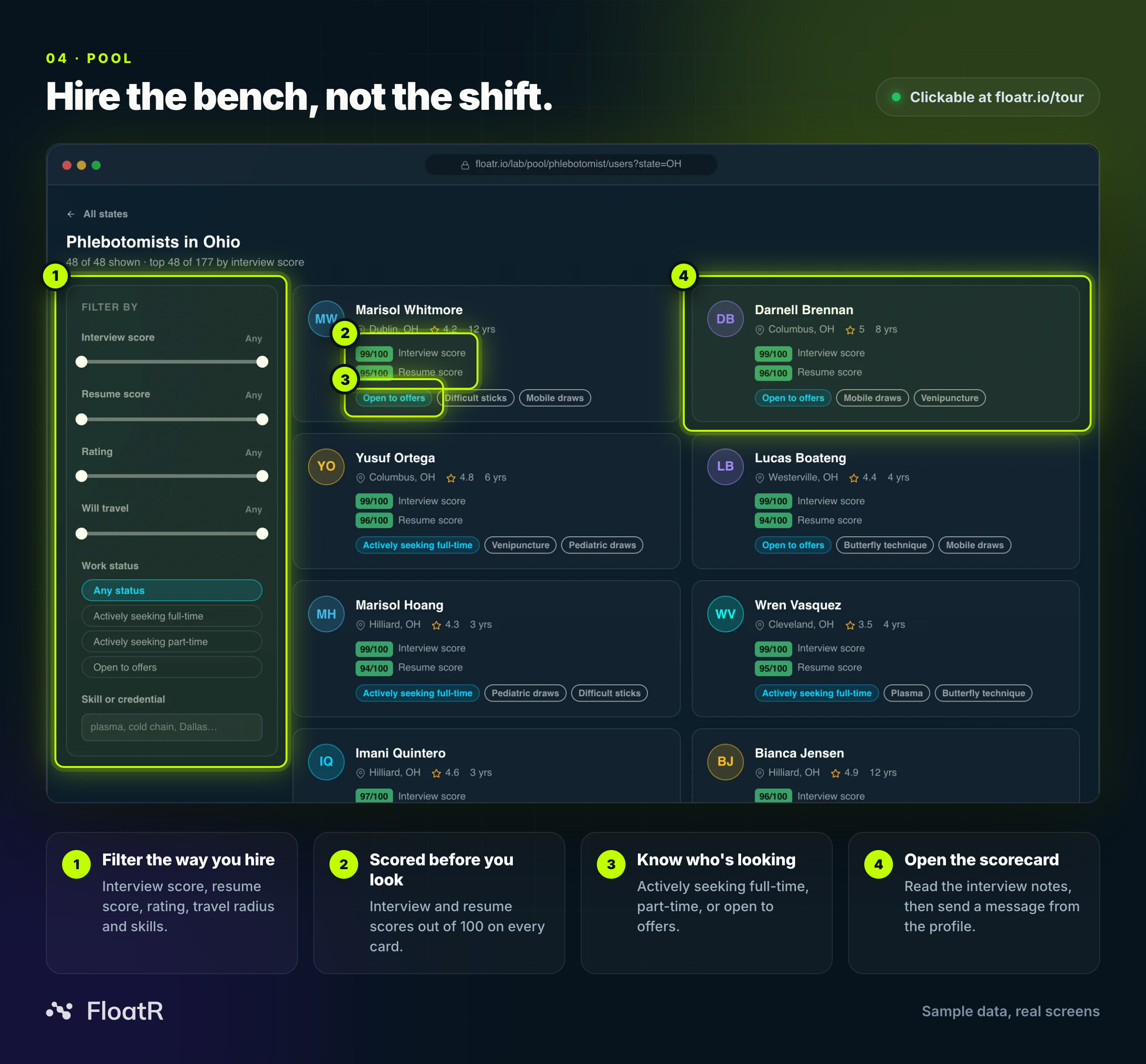
Pool is FloatR's national hiring pool, organized by role and by state. Pick a role, pick a state, and browse candidates with their ratings, years of experience, interview and resume scores out of 100, work status and skills. Narrow it down with sliders for interview score, resume score, rating and travel distance, show only the people actively seeking full-time or part-time work, or search for a skill.
Open a profile for the full interview scorecard: what went well, what's worth probing, and what the candidate actually said. Then message them straight from the profile.
Here's the part that matters. Agencies charge a placement fee every time you hire someone. Pool is a subscription, and hiring is included, with no per-hire fee.
Try this: Choose Phlebotomist, then Ohio, switch on Open to offers, then open the top card and read the interview scorecard.
5. Analytics: know what coverage actually costs
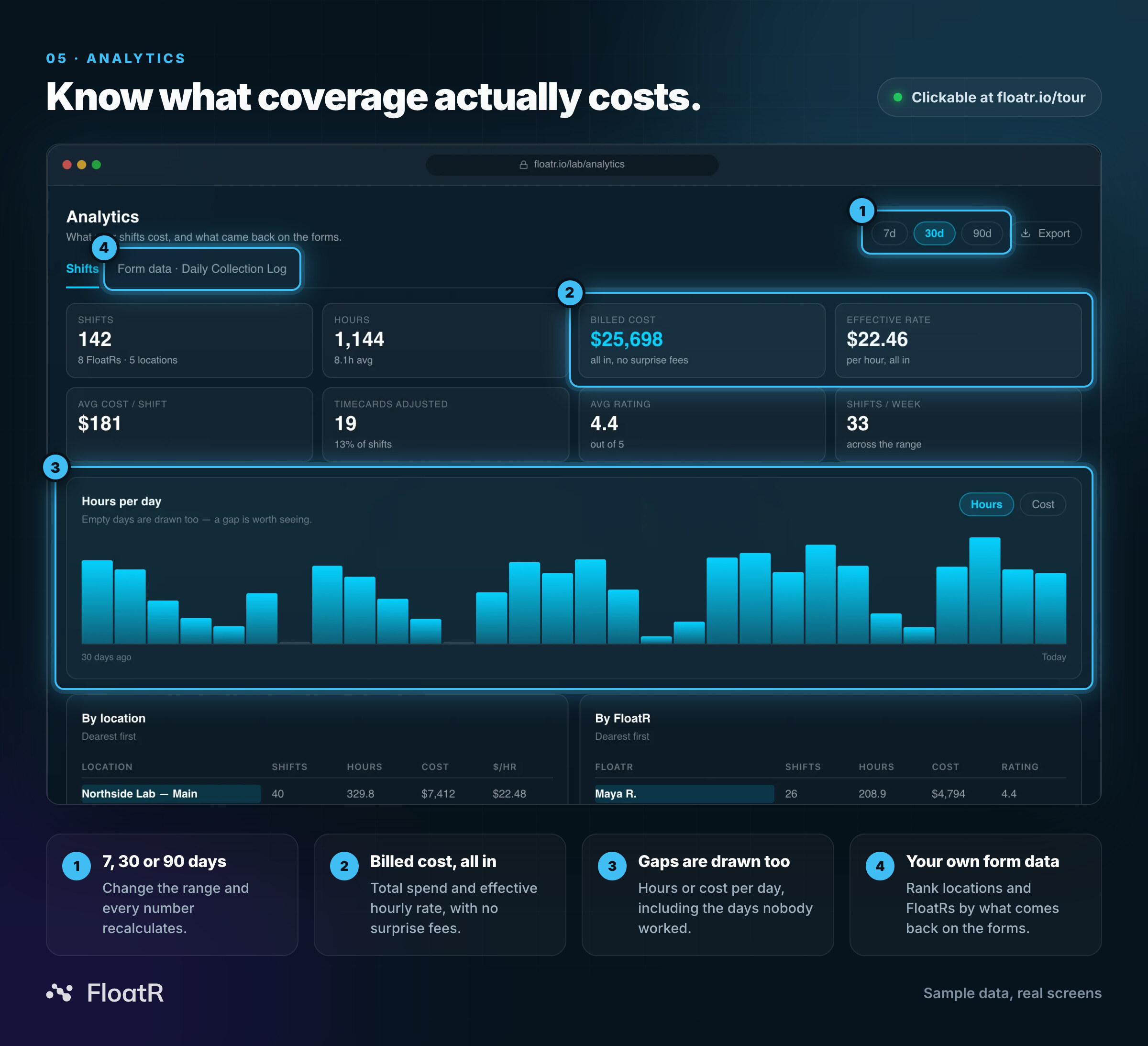
Analytics answers the question finance always gets around to asking: what did coverage actually cost? You get shifts, hours, billed cost (all in, no surprise fees), effective hourly rate, average cost per shift, adjusted timecards and average rating over 7, 30 or 90 days. The daily chart flips between hours and cost, and it draws the empty days too, because a gap is worth seeing. Below it, every location and every FloatR is ranked by spend.
Switch to Form data and it gets more interesting. The answers FloatRs submit on their shift forms (specimens collected, draws completed, patients seen, redraws required) become a leaderboard of cost per unit and units per hour, by location or by FloatR. Switch a question off and the board re-prices without it.
Try this: Set the range to 90d, flip the chart to Cost, then open Form data and switch off Redraws required.
Why we built it
We think software makes sense at the moment you use it. Not when someone describes it, and not when you watch someone else drive, but when you click a button and see what happens next.
Staffing is a trust decision. You're deciding who walks into your lab and stands in front of your patients. You should be able to see exactly how that decision gets made, including who applied, what they've done for you and what they cost, before you commit to anything.
The tour lets you answer the questions that matter, on your own schedule:
- Is posting a shift really this easy?
- Will I actually know who's showing up?
- Can I prove everyone on the floor was trained?
- Where would I find more people?
- What will coverage really cost?
Every answer is one tab away.
Questions you might have
Do I need an account to use the tour?
No. Open floatr.io/tour in any browser and start clicking.
Is that real data?
No. The lab, the shifts, the FloatRs and the candidates are all invented. The screens are real. They're the ones your account opens on.
Will anything I click be saved?
No. Your changes last while you're on the page, even as you switch between tabs. Reload and the week resets.
Can I share a specific screen with my team?
Yes. Each tab has its own link, so you can send someone straight to the one you're talking about, for example
floatr.io/tour?tab=analytics.What happens when I'm ready for the real thing?
Get started with a simple service agreement and no long-term commitment, or book a demo and we'll set it up with you.
Your turn to drive
Five screens. One invented lab. No account, no sales call, nothing to lose.
Take the tour at floatr.io/tour. When you're ready for the real thing, get started, or if you'd rather have a guide, book a demo.